

In the world of ERP systems, Business Central is known for its flexibility, scalability, and adaptability to various industries. However, when you’re transitioning an on-premises Business Central solution to the cloud, one of the key challenges is handling file integrations. Our product, heavily reliant on file integrations, faced this exact hurdle. Without the ability to manage file integrations seamlessly, moving our product to SaaS was a difficult task.
Thankfully, with the Dynamics 365 Business Central 23.3 release and a significant community contribution, the challenge was met head-on with the introduction of a native Azure File Share AL module. This integration became the game-changer, enabling us to rewrite our application from relying on on-premise file systems to leveraging the powerful, scalable, and secure Azure File Share services. Here’s a complete guide to how we successfully transitioned, along with tips and insights on how you can implement Azure File Share in your Business Central projects.
For developers and teams facing similar challenges with on-prem file integrations in Business Central, this AL module is a game-changer. I’m sharing sample code on GitHub and a video tutorial for your reference, to help guide you through the process of integrating Azure File Share into your Business Central applications.
https://github.com/akhileshekartha/AzFileService
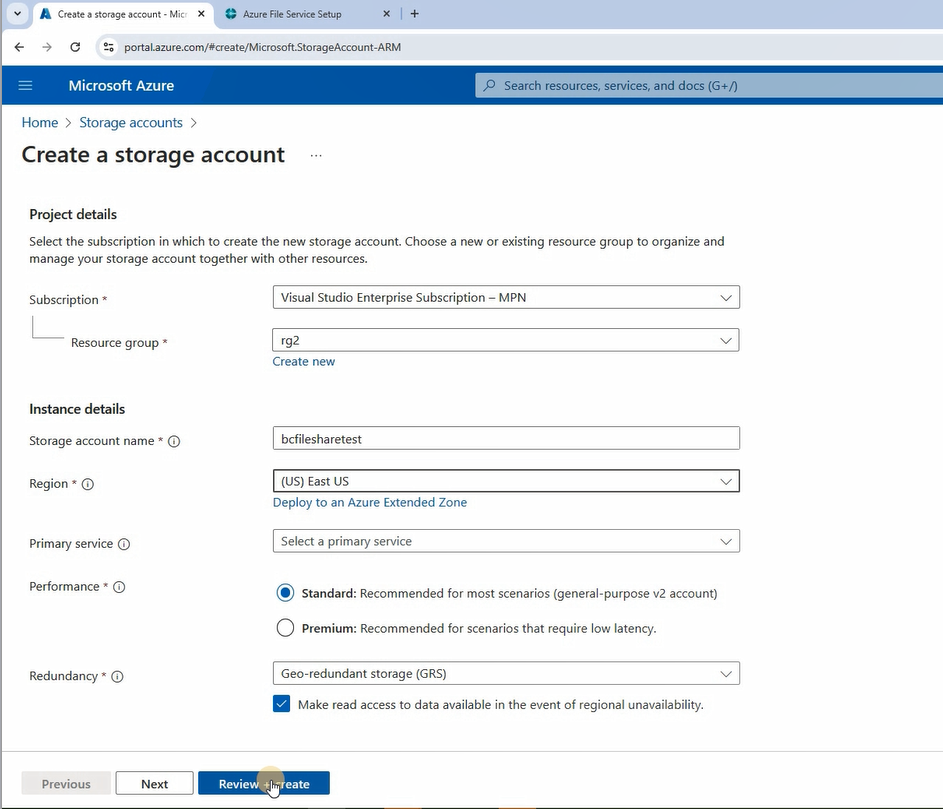
Open Azure portal. Select Storage account

Create a Storage account
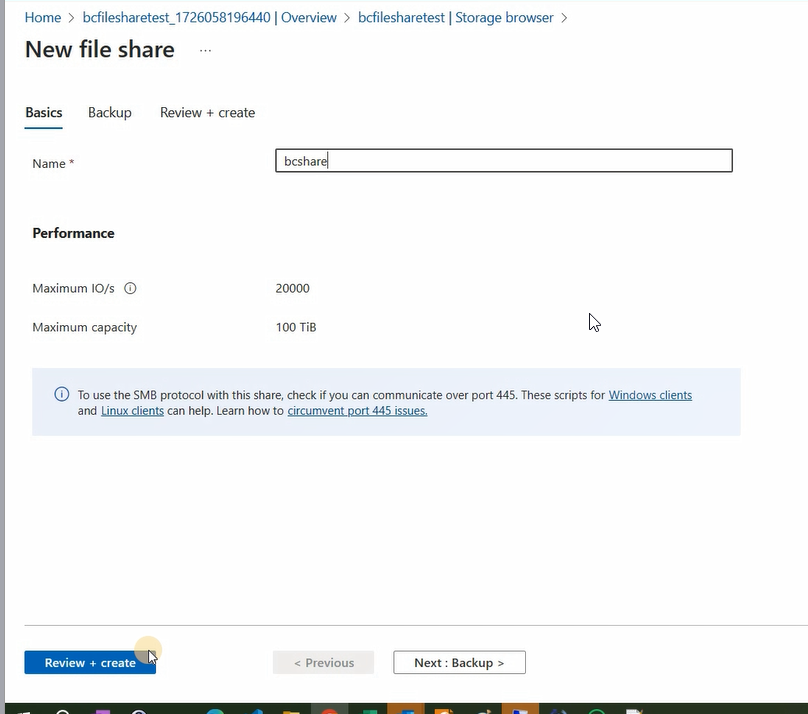
Update a file share
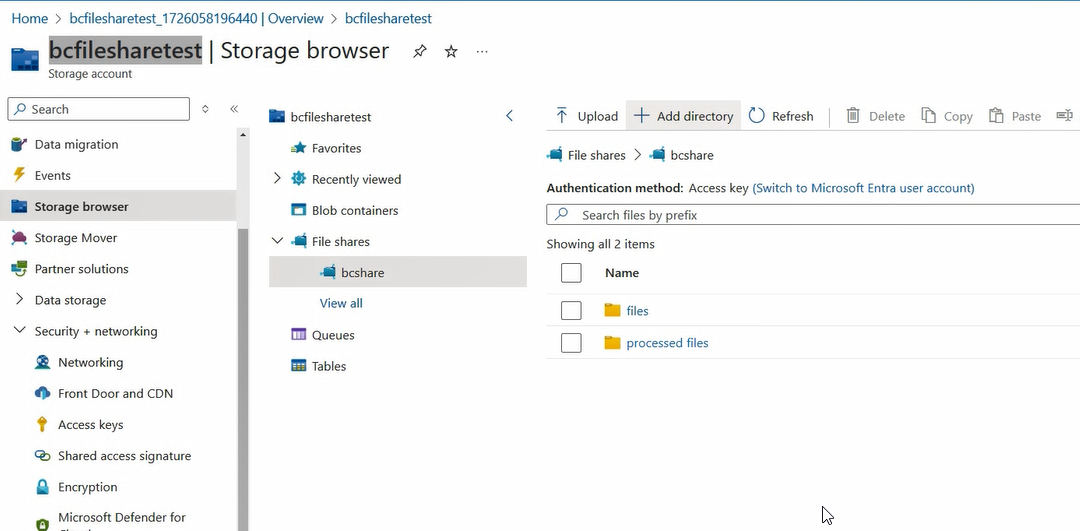
Create folders
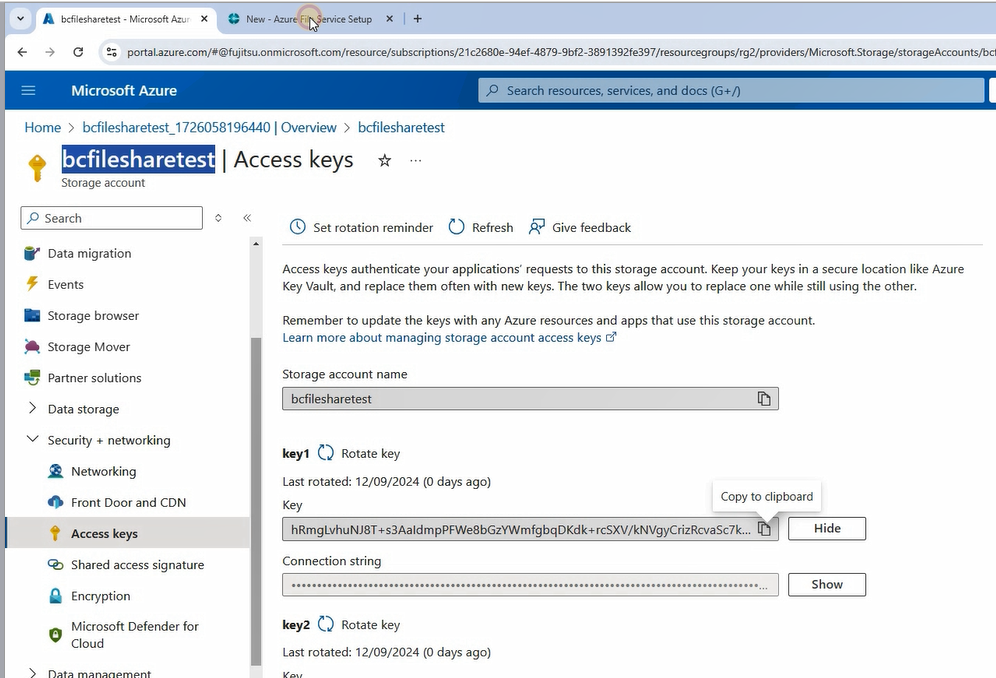
copy key
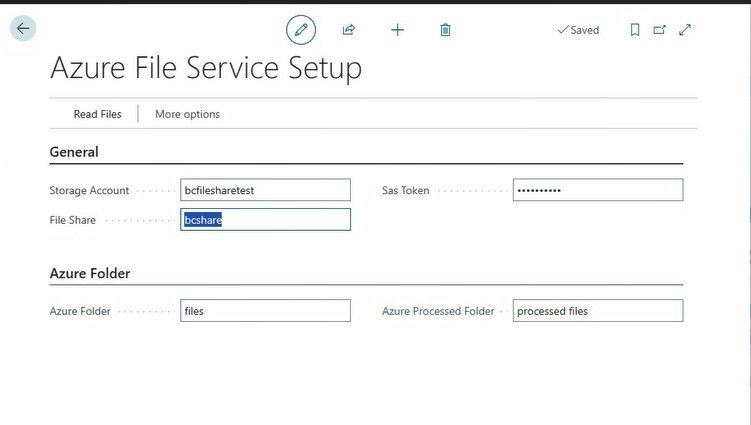
update setups in BC
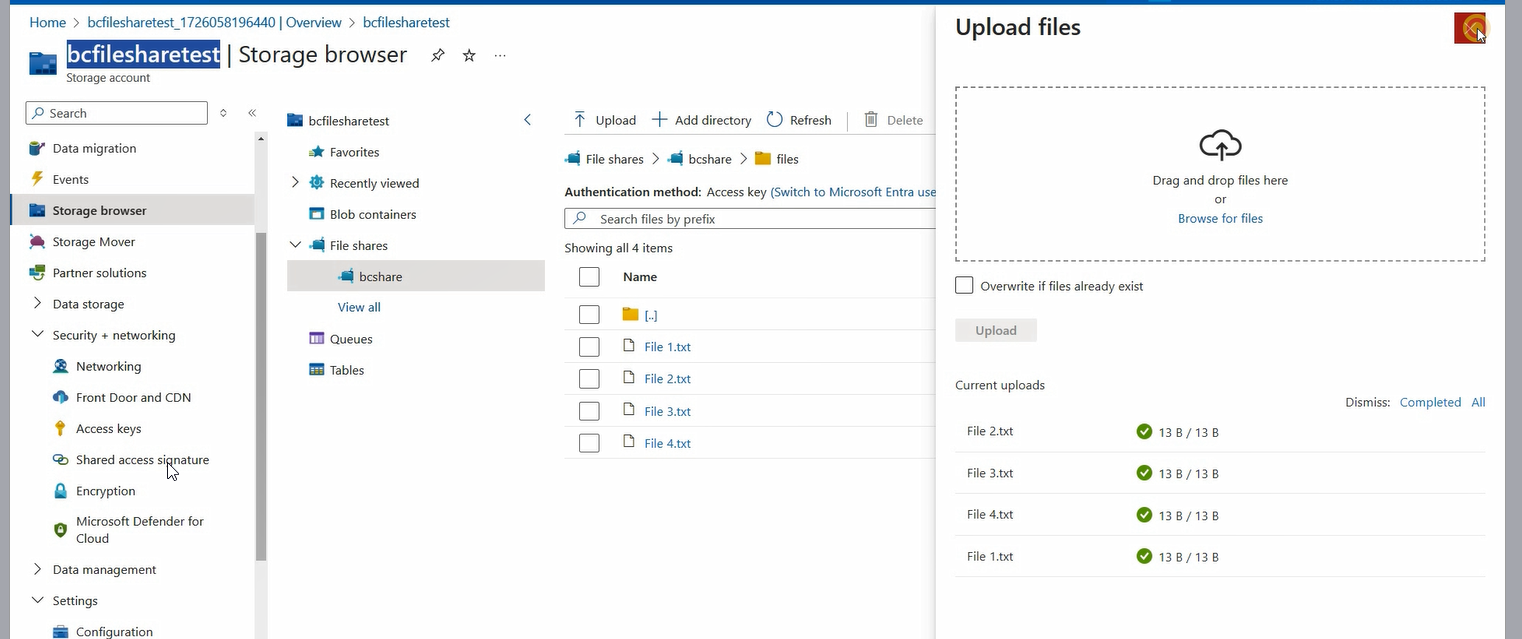
copy test files to azure folder
Test Read File Function

With the introduction of the Azure File Share AL module in Business Central 23.3, we were able to successfully move our product to the cloud without losing the critical file integration functionality we relied on. By leveraging Azure’s scalable and secure storage services, we now have a robust and future-proof solution in place.
This transition not only enabled us to move to SaaS but also unlocked the potential for better performance, improved scalability, and enhanced security, ensuring that our product is ready for the cloud-native future.
For anyone facing similar challenges with on-premise file integrations in Business Central, Azure File Share is a powerful tool that makes the transition to cloud much easier. The combination of Business Central’s AL module and Azure’s storage capabilities ensures that you can manage files efficiently in a cloud-first world.
codeunit 50100 "AKH Azure File Service"
{
    var
        AzureFileServiceSetup: Record "AKH Azure File Service Setup";

    procedure ReadListFromShare(FilePath: Text; var AFSDirectoryContent: Record "AFS Directory Content")
    var
        AFSFileClient: Codeunit "AFS File Client";
        AFSOperationResponse: Codeunit "AFS Operation Response";
        StorageAccountAutherization: Codeunit "Storage Service Authorization";
    begin
        AzureFileServiceSetup.Get();
        AzureFileServiceSetup.TestField("Storage Account");
        AzureFileServiceSetup.TestField("File Share");
        AzureFileServiceSetup.TestField("Sas Token");
        AFSFileClient.Initialize(AzureFileServiceSetup."Storage Account", AzureFileServiceSetup."File Share",
        StorageAccountAutherization.CreateSharedKey(AzureFileServiceSetup."Sas Token"));
        AFSOperationResponse := AFSFileClient.ListDirectory(FilePath, AFSDirectoryContent);
        if not AFSOperationResponse.IsSuccessful() then
            Error(AFSOperationResponse.GetError());
    end;

    procedure ReadFileFromShare(FilePath: Text; var FileText: Text)
    var
        AFSFileClient: Codeunit "AFS File Client";
        AFSOperationResponse: Codeunit "AFS Operation Response";
        StorageAccountAutherization: Codeunit "Storage Service Authorization";
        Authorization: Interface "Storage Service Authorization";
        FileShare: Text;
        StorageAccount: Text;
    begin
        AzureFileServiceSetup.Get();
        AzureFileServiceSetup.TestField("Storage Account");
        AzureFileServiceSetup.TestField("File Share");
        AzureFileServiceSetup.TestField("Sas Token");

        AFSFileClient.Initialize(AzureFileServiceSetup."Storage Account", AzureFileServiceSetup."File Share",
        StorageAccountAutherization.CreateSharedKey(AzureFileServiceSetup."Sas Token"));

        //AFSOperationResponse := AFSFileClient.GetFileAsStream(FilePath,FileInstream);
        AFSFileClient.GetFileAsText(FilePath, FileText);
        if not AFSOperationResponse.IsSuccessful() then
            Error(AFSOperationResponse.GetError());
    end;

    procedure MoveFileFromShare(FromFilePath: Text; ToFilePath: Text; FileName: Text; FileText: Text)
    var
        AFSFileClient: Codeunit "AFS File Client";
        AFSOperationResponse: Codeunit "AFS Operation Response";
        StorageAccountAutherization: Codeunit "Storage Service Authorization";
        TempBlob: Codeunit "Temp Blob";
        FileInStream: InStream;
        Authorization: Interface "Storage Service Authorization";
        lblErrorCopyFile: Label 'Error copying file from %1 to %2 \Error message %3', Comment = '%1 = From File Path, %2 = To File Path';
        FileOutStream: OutStream;
        FileShare: Text;
        StorageAccount: Text;
    begin
        FromFilePath := FromFilePath.Replace('\', '/');
        ToFilePath := ToFilePath.Replace('\', '/');
        AzureFileServiceSetup.Get();
        AzureFileServiceSetup.TestField("Storage Account");
        AzureFileServiceSetup.TestField("File Share");
        AzureFileServiceSetup.TestField("Sas Token");

        AFSFileClient.Initialize(AzureFileServiceSetup."Storage Account", AzureFileServiceSetup."File Share",
        StorageAccountAutherization.CreateSharedKey(AzureFileServiceSetup."Sas Token"));
        TempBlob.CreateOutStream(FileOutStream);
        FileOutStream.WriteText(FileText);
        TempBlob.CreateInStream(FileInStream);


        WriteFiletoShare(ToFilePath + '\' + FileName, FileInStream);

        AFSOperationResponse := AFSFileClient.DeleteFile(FromFilePath);
        if not AFSOperationResponse.IsSuccessful() then
            Error(AFSOperationResponse.GetError());
    end;

    procedure WriteFiletoShare(FilePath: Text; var FileContent: InStream)
    var
        AFSFileClient: Codeunit "AFS File Client";
        AFSOperationResponse: Codeunit "AFS Operation Response";
        StorageAccountAutherization: Codeunit "Storage Service Authorization";
        Authorization: Interface "Storage Service Authorization";
        FileShare: Text;
        StorageAccount: Text;
    begin
        AzureFileServiceSetup.Get();
        AzureFileServiceSetup.TestField("Storage Account");
        AzureFileServiceSetup.TestField("File Share");
        AzureFileServiceSetup.TestField("Sas Token");

        AFSFileClient.Initialize(AzureFileServiceSetup."Storage Account", AzureFileServiceSetup."File Share",
        StorageAccountAutherization.CreateSharedKey(AzureFileServiceSetup."Sas Token"));

        AFSOperationResponse := AFSFileClient.CreateFile(FilePath, FileContent);
        if not AFSOperationResponse.IsSuccessful() then
            Error(AFSOperationResponse.GetError());
        AFSOperationResponse := AFSFileClient.PutFileStream(FilePath, FileContent);
        if not AFSOperationResponse.IsSuccessful() then
            Error(AFSOperationResponse.GetError());
    end;


}
References
Discover more from AkhileshKartha.com
Subscribe to get the latest posts sent to your email.
 AkhileshKartha.com
Leave a comment