

Managing build pipelines can often be complicated, especially when trying to identify the Business Central (BC) versions in the ever-evolving landscape of DevOps. This task becomes even more challenging with the constant updates from Microsoft, releasing new artifacts daily for both major and minor pipelines.
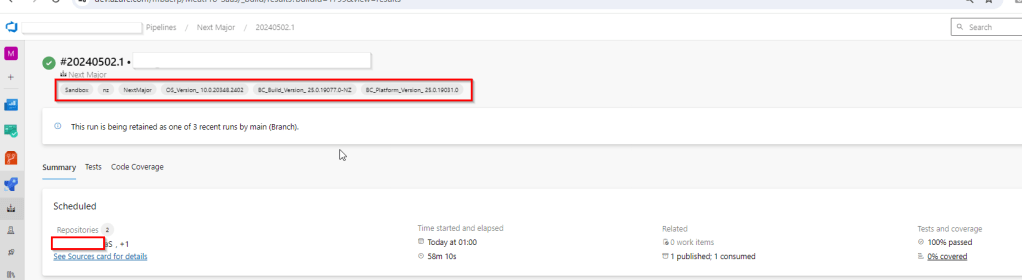
I’ve implemented enhancements to our build pipeline process. To simplify and streamline operations, we now automatically update the build tags to include BC version details. This adjustment eliminates the need to manually dig through the pipeline steps to find this crucial information.
$NavVersion = Get-BcContainerNavVersion -containerOrImageName $ContainerName
$PlatformVersion = Get-BcContainerPlatformVersion -containerOrImageName $ContainerName
$OsVersion = Get-BcContainerOsVersion -containerOrImageName $ContainerName

Write-Host "##vso[build.addbuildtag]"$ImageType
Write-Host "##vso[build.addbuildtag]"$Type
Write-Host "##vso[build.addbuildtag]"$bcCountry
Write-Host "##vso[build.addbuildtag] BC_Build_Version_"$NavVersion
Write-Host "##vso[build.addbuildtag]BC_Platform_Version_"$PlatformVersion
Write-Host "##vso[build.addbuildtag]OS_Version_"$OsVersion
With this new system in place, the version details are readily visible and accessible right on the build tag itself. This means less time spent on routine checks and more time available for focusing on more critical aspects of system development and optimization. Our teams can now quickly identify the version of each build at a glance, ensuring smoother workflow and increased productivity in our DevOps environment.
Discover more from AkhileshKartha.com
Subscribe to get the latest posts sent to your email.
 AkhileshKartha.com
Leave a comment